

Is it for you?
- ✅ Ideal if you need
- ❌ Not ideal if
- Collect contact information automatically
- Capture data without manual errors
- Update your CRM automatically
- Prepare information for your sales team
- Reduce response time to prospects
Use cases by industry
- 🏠 Real Estate
- 🏥 Medicine
- 🎓 Education
- 🔧 Services
- 🛒 E-commerce
Collect: Budget, area of interest, property type, urgencyResult: Agents focus time on prospects with real budget
Basic configuration
1
Adjust general settings
Communication Style: Adjust the slider according to your brand:
- Casual: Relaxed and friendly conversation
- Professional: Formal and business tone
2
Define the agent's role
In the “Define Agent Role” text area, specifically describe:
- What your company does
- What the agent’s objective is
- How it should behave
3
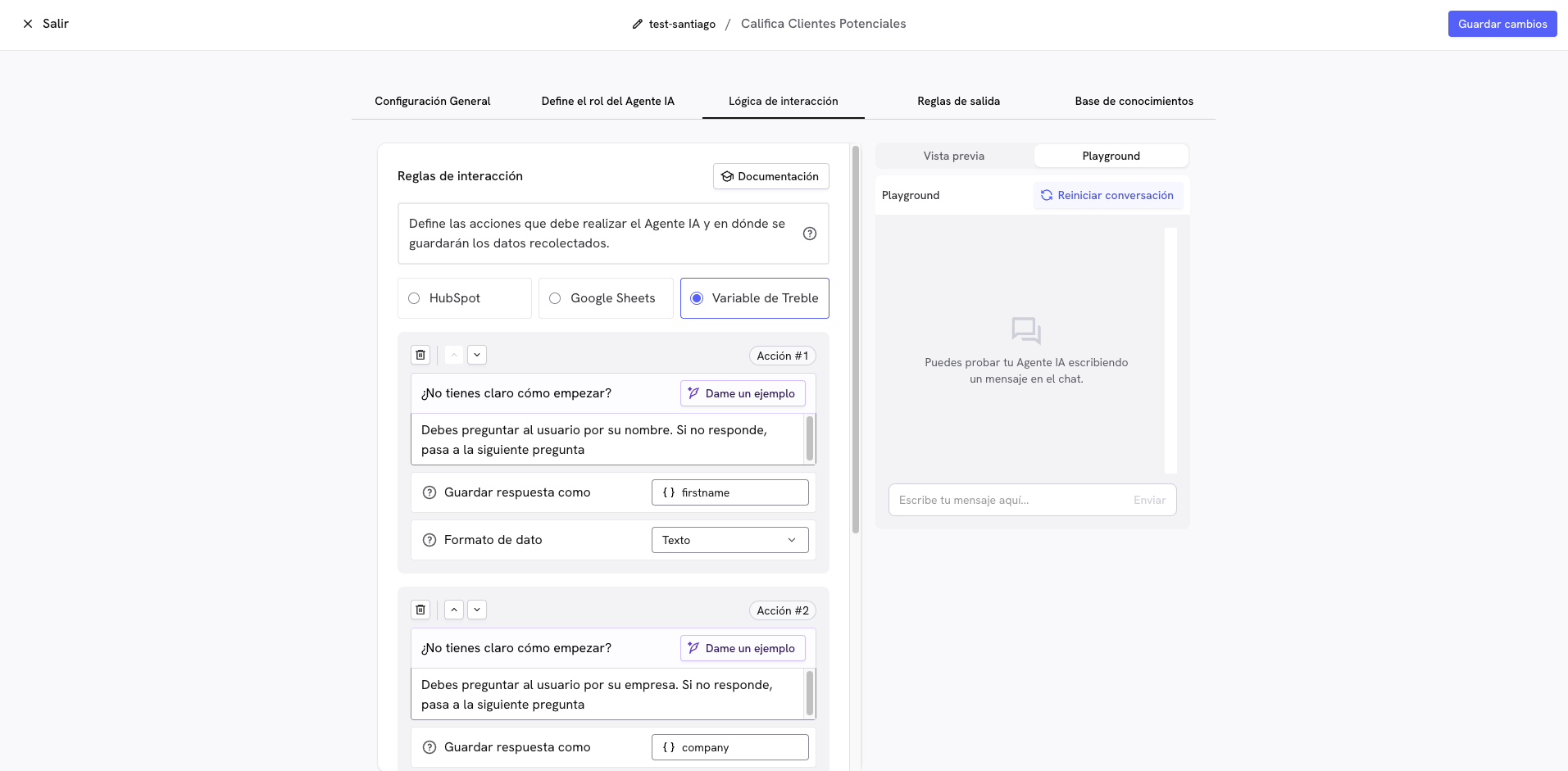
Configure interaction rules
The interaction rules are all the questions this agent will ask your customers. In the configuration, you can also choose the data destination:
- HubSpot: Data is saved directly to your CRM
- Google Sheets: Information is stored in a spreadsheet
- Treble Variable: Internal variables to use with other blocks
4
Establish exit rules
At this stage, you can see all the exit options the agent has. These options will allow you to connect with other blocks in the conversation builder:
- All actions completed: When it collects all requested information
- Uncompleted actions: With partial information
- No actions completed: If the user doesn’t provide any relevant information
- Critical conversation: For cases requiring immediate human intervention, for example when the user is upset
5
Add additional context
Upload your knowledge base so the agent can answer questions about:
- Your company description
- Products or services
- General prices
- Frequently asked questions
6
Save the agent
Click “Save” to create the agent. Once saved, it will be available to use in the Conversation Builder.
7
Add the agent to the Conversation Builder
- Go to the Conversation Builder
- Drag the “Lead Qualification with AI” block to your flow
- Select your agent from the dropdown list
- Configure automatic follow-ups for users who don’t respond:
- Frequency: Every X minutes (recommended: 30-90 minutes)
- Attempts: Maximum Y attempts (recommended: 2-3 attempts)
8
Connect exit rules
Now connect each agent output with the corresponding blocks. Once the outputs are connected, your agent will be ready to collect information automatically.
Maximize value with conditional blocks
Once the agent collects information, use conditional blocks to automatically qualify and take specific actions according to each lead’s profile.How conditional blocks work
Conditional blocks evaluate collected information and direct each lead through personalized routes: Basic workflow structure:1
Evaluate with a conditional block
Drag a “Conditions” block after your qualification agent.Configure the condition according to collected data:
- Property: Select the agent variable (e.g.
budget,city,company) - Operator: Choose from
contains,equals,greater than,less than,different from - Value: Define the criterion (e.g.
$10,000,Mexico City,50 employees)
budget is greater than $10,0002
Update your CRM
Connect the conditional block output with a “CRM Action” block.Update properties in HubSpot/Salesforce:
- Property:
lead_status - Value:
QualifiedorNot Qualified
3
Send personalized message
Connect the CRM block with a message block specific to that type of lead.
- Qualified prospect: “Perfect! Our sales team will contact you in the next 2 hours” And then redirect to a human agent block
- Non-qualified prospect: “Thank you for your interest. We’ll keep you informed about new options”
Frequently asked questions
Does the agent qualify leads automatically?
Does the agent qualify leads automatically?
No. The agent only collects information. You do the qualification afterward with conditional blocks based on captured data.
Can I modify the questions later?
Can I modify the questions later?
Yes. You can edit the role, questions, and knowledge base at any time.
Are data saved if they don't complete everything?
Are data saved if they don't complete everything?
Yes. Variables are saved progressively, even if the user doesn’t finish.
Can I use multiple agents?
Can I use multiple agents?
Yes. You can use different agents to collect different types of information.
Does it work with other CRMs?
Does it work with other CRMs?
Directly only HubSpot and Salesforce. For other CRMs use Treble Variables and webhooks.
Can the agent understand WhatsApp voice messages?
Can the agent understand WhatsApp voice messages?
Yes. The agent can understand voice messages sent by users through WhatsApp and will automatically respond with text in the conversation.
Troubleshooting
Doesn't collect all information
Doesn't collect all information
Common causes:
- Questions too invasive too early
- Illogical question order
- Failure to explain why data is needed
- Start with basic questions
- Explain the value of each requested data
- Reorder according to user logic
Incorrect data in CRM
Incorrect data in CRM
Common causes:
- Misconfigured variables
- Incorrect field mapping
- Incompatible format
- Verify configuration in HubSpot/Salesforce
- Review variable mapping in Treble
- Test first in Playground
Users abandon the process
Users abandon the process
Common causes:
- Process too long
- Irrelevant questions
- Lack of perceived value
- Reduce essential questions
- Intersperse with valuable information
- Explain benefits of completing
Important considerations
Privacy: Inform users that their data will be saved and comply with applicable regulations (GDPR, etc.).