> ## Documentation Index
> Fetch the complete documentation index at: https://help.treble.ai/llms.txt
> Use this file to discover all available pages before exploring further.

# Connect WhatsApp Line

> Learn all the steps and requirements from Meta to connect your own WhatsApp number to Treble.ai.

<div id="interactive-guide-loaded" />

<div className="interactive-guide">
  <div className="step-navigation">
    <button className="step-indicator current" onClick={() => goToStep(1)}>1</button>
    <button className="step-indicator" onClick={() => goToStep(2)}>2</button>
    <button className="step-indicator" onClick={() => goToStep(3)}>3</button>
    <button className="step-indicator" onClick={() => goToStep(4)}>4</button>
    <button className="step-indicator" onClick={() => goToStep(5)}>5</button>
    <button className="step-indicator" onClick={() => goToStep(6)}>6</button>
  </div>

  <div id="step1" className="step-container active current">
    <h3>1. Do you have a registered business?</h3>
    <p>To connect WhatsApp to Treble.ai, you need to have a legally registered business.</p>

    <div className="choice-buttons">
      <button className="choice-button yes" onClick={() => handleResponse('step1', true)}>Yes, I have a registered business</button>
      <button className="choice-button no" onClick={() => handleResponse('step1', false)}>No, I don't have one yet</button>
    </div>

    <div id="step1-error" className="result-message">
      To continue and use WhatsApp Business API, you need to have a registered business. We recommend consulting with a legal advisor to register your business.
    </div>
  </div>

  <div id="step2" className="step-container">
    <h3>2. Do you have a website with your own domain?</h3>
    <p>It is necessary to have a website with your own domain to use WhatsApp Business API.</p>

    <div className="choice-buttons">
      <button className="choice-button yes" onClick={() => handleResponse('step2', true)}>Yes, I have a website</button>
      <button className="choice-button no" onClick={() => handleResponse('step2', false)}>No, I don't have one yet</button>
    </div>

    <div id="step2-substeps" className="sub-steps">
      <p>Please verify that you meet the following requirements:</p>

      <div id="step2-sub1" className="checkbox-item">
        <div className="checkbox-row">
          <div className="checkbox-label">
            <span>Do you have your legal business name in the footer of your website?</span>
          </div>

          <div className="toggle-buttons">
            <button className="toggle-button yes" onClick={() => handleSubStep('step2', 'step2-sub1', true)}>Yes</button>
            <button className="toggle-button no" onClick={() => handleSubStep('step2', 'step2-sub1', false)}>No</button>
          </div>
        </div>

        <div id="step2-sub1-help" className="sub-step-help">
          You need to have the legal business name in the footer of your website.
          <a class="article-link" href="/en/docs/meta/guide/preparing-website#2-legal-business-name-in-the-footer-of-your-website"><p>How to add the legal business name in the footer of your website?</p><Icon icon="arrow-up-right-from-square" iconType="solid" /></a>
        </div>
      </div>

      <div id="step2-sub2" className="checkbox-item">
        <div className="checkbox-row">
          <div className="checkbox-label">
            <span>Do you have an email service associated with your domain?</span>
          </div>

          <div className="toggle-buttons">
            <button className="toggle-button yes" onClick={() => handleSubStep('step2', 'step2-sub2', true)}>Yes</button>
            <button className="toggle-button no" onClick={() => handleSubStep('step2', 'step2-sub2', false)}>No</button>
          </div>
        </div>

        <div id="step2-sub2-help" className="sub-step-help">
          You must be able to receive emails at email addresses associated with your domain. <a class="article-link" href="/en/docs/meta/guide/preparing-website#3-have-email-service-associated-with-your-domain"><p>Email associated with your domain</p><Icon icon="arrow-up-right-from-square" iconType="solid" /></a>
        </div>
      </div>

      <div id="step2-sub3" className="checkbox-item">
        <div className="checkbox-row">
          <div className="checkbox-label">
            <span>Do you have your business address in the footer of your website?</span>
          </div>

          <div className="toggle-buttons">
            <button className="toggle-button yes" onClick={() => handleSubStep('step2', 'step2-sub3', true)}>Yes</button>
            <button className="toggle-button no" onClick={() => handleSubStep('step2', 'step2-sub3', false)}>No</button>
          </div>
        </div>

        <div id="step2-sub3-help" className="sub-step-help">
          You should have the physical address of your business in the footer of your website. <a class="article-link" href="/en/docs/meta/guide/preparing-website#4-recommended-have-the-physical-address-of-the-business-in-the-footer-of-your-website"><p>Business address in the footer of your website</p><Icon icon="arrow-up-right-from-square" iconType="solid" /></a>
        </div>
      </div>

      <div id="step2-sub4" className="checkbox-item">
        <div className="checkbox-row">
          <div className="checkbox-label">
            <span>Do you have your business phone number in the footer of your website?</span>
          </div>

          <div className="toggle-buttons">
            <button className="toggle-button yes" onClick={() => handleSubStep('step2', 'step2-sub4', true)}>Yes</button>
            <button className="toggle-button no" onClick={() => handleSubStep('step2', 'step2-sub4', false)}>No</button>
          </div>
        </div>

        <div id="step2-sub4-help" className="sub-step-help">
          You should have your business phone number in the footer of your website. <a class="article-link" href="/en/docs/meta/guide/preparing-website#5-recommended-have-your-business-phone-number-in-the-footer-of-your-website"><p>Business phone number in the footer of your website</p><Icon icon="arrow-up-right-from-square" iconType="solid" /></a>
        </div>
      </div>

      <div className="progress-indicator">
        <div id="step2-progress" className="progress-bar" />
      </div>

      <div id="step2-summary" className="sub-steps-summary">
        Excellent! You have completed all the website requirements
      </div>
    </div>

    <div id="step2-error" className="result-message">
      <p>You need to have a website with your own domain. Learn the requirements your website must meet with our guide <a class="article-link" href="/en/docs/meta/guide/preparing-website"><p>Prepare your website</p><Icon icon="arrow-up-right-from-square" iconType="solid" /></a></p>
    </div>
  </div>

  <div id="step3" className="step-container">
    <h3>3. Do you have a Meta business portfolio?</h3>
    <p>You need to have a Meta business portfolio to use WhatsApp Business API.</p>

    <div className="choice-buttons">
      <button className="choice-button yes" onClick={() => handleResponse('step3', true)}>Yes, I have a business portfolio</button>
      <button className="choice-button no" onClick={() => handleResponse('step3', false)}>No, I don't have a business portfolio</button>
    </div>

    <div id="step3-substeps" className="sub-steps">
      <p>Please verify that you meet the following requirements:</p>

      <div id="step3-sub1" className="checkbox-item">
        <div className="checkbox-row">
          <div className="checkbox-label">
            <span>Do you have a Facebook fanpage created?</span>
          </div>

          <div className="toggle-buttons">
            <button className="toggle-button yes" onClick={() => handleSubStep('step3', 'step3-sub1', true)}>Yes</button>
            <button className="toggle-button no" onClick={() => handleSubStep('step3', 'step3-sub1', false)}>No</button>
          </div>
        </div>

        <div id="step3-sub1-help" className="sub-step-help">
          You need to have a Facebook fanpage created.
          <a class="article-link" href="/en/docs/meta/guide/business-manager#what-is-a-fanpage"><p>What is a fanpage?</p><Icon icon="arrow-up-right-from-square" iconType="solid" /></a>
        </div>
      </div>

      <div id="step3-sub2" className="checkbox-item">
        <div className="checkbox-row">
          <div className="checkbox-label">
            <span>Do you have your business assets associated with your business portfolio?</span>
          </div>

          <div className="toggle-buttons">
            <button className="toggle-button yes" onClick={() => handleSubStep('step3', 'step3-sub2', true)}>Yes</button>
            <button className="toggle-button no" onClick={() => handleSubStep('step3', 'step3-sub2', false)}>No</button>
          </div>
        </div>

        <div id="step3-sub2-help" className="sub-step-help">
          You must have your business assets associated with your business portfolio. <a class="article-link" href="/en/docs/meta/guide/business-manager#what-are-the-business-assets-of-my-meta-business-portfolio"><p>What is a business asset?</p><Icon icon="arrow-up-right-from-square" iconType="solid" /></a>
        </div>
      </div>

      <div id="step3-sub3" className="checkbox-item">
        <div className="checkbox-row">
          <div className="checkbox-label">
            <span>Have you filled in all your business information for your business portfolio?</span>
          </div>

          <div className="toggle-buttons">
            <button className="toggle-button yes" onClick={() => handleSubStep('step3', 'step3-sub3', true)}>Yes</button>
            <button className="toggle-button no" onClick={() => handleSubStep('step3', 'step3-sub3', false)}>No</button>
          </div>
        </div>

        <div id="step3-sub3-help" className="sub-step-help">
          You must have all your business information in your business portfolio. <a class="article-link" href="/en/docs/meta/guide/business-manager#complete-business-information-in-the-business-portfolio"><p>How to complete my business information in my business portfolio?</p><Icon icon="arrow-up-right-from-square" iconType="solid" /></a>
        </div>
      </div>

      <div className="progress-indicator">
        <div id="step3-progress" className="progress-bar" />
      </div>

      <div id="step3-summary" className="sub-steps-summary">
        Excellent! You have completed all the business portfolio requirements
      </div>
    </div>

    <div id="step3-error" className="result-message">
      It is necessary for you to have a Meta business portfolio, have connected your business assets, and have completed all your business information to use WhatsApp Business API. Learn more about how to create a Meta business portfolio <a class="article-link" href="/en/docs/meta/guide/business-manager"><p>Create a Meta business portfolio</p><Icon icon="arrow-up-right-from-square" iconType="solid" /></a>
    </div>
  </div>

  <div id="step4" className="step-container">
    <h3>4. Is your business portfolio verified?</h3>
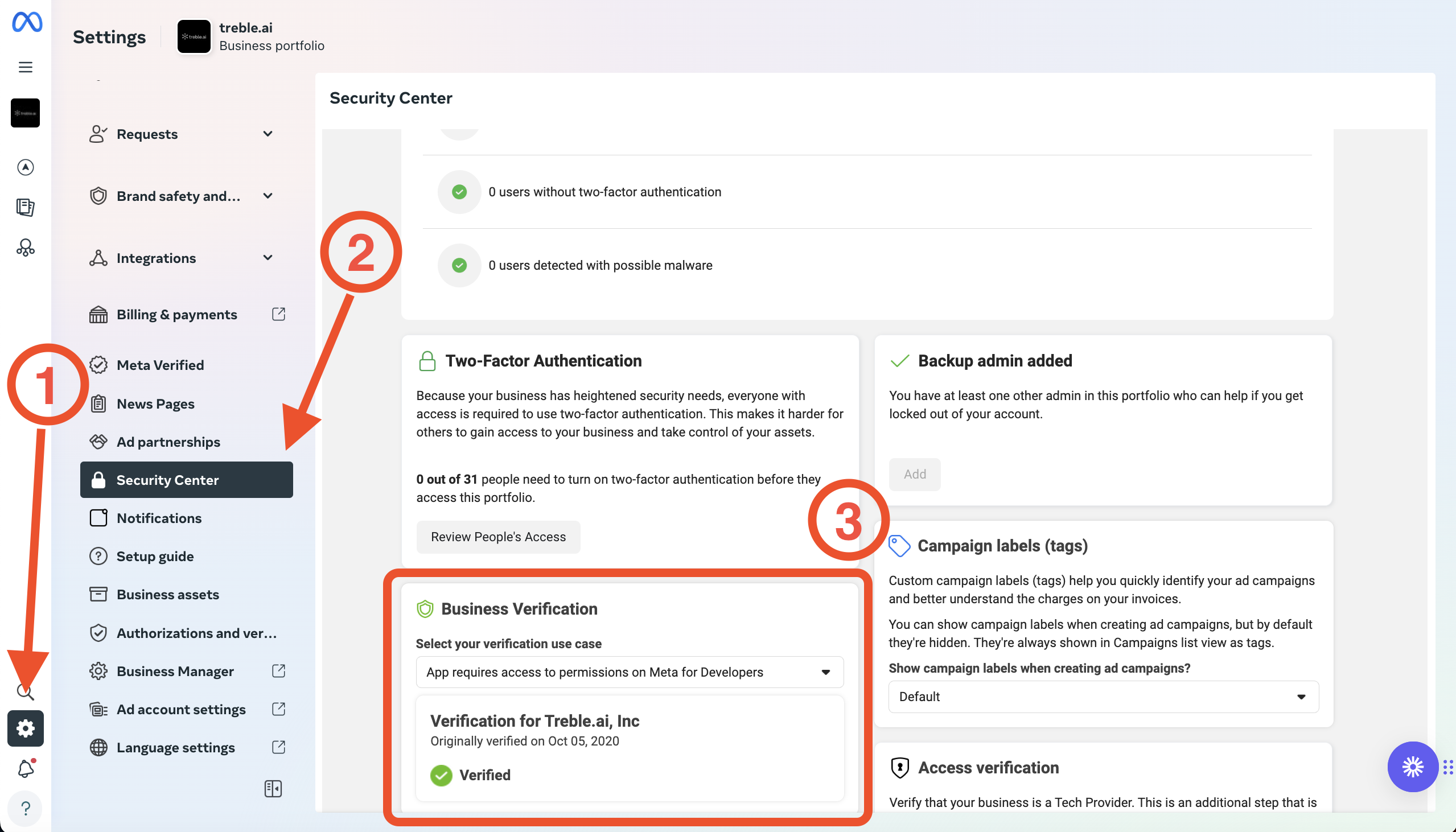
    <p>Meta requires your business portfolio to be verified to use WhatsApp Business API. To quickly check if your business portfolio is verified, follow these steps:</p>

    1. Log in to your Meta Business Manager account by accessing <a class="article-link" href="https://business.facebook.com/"><p>[https://business.facebook.com/](https://business.facebook.com/)</p><Icon icon="arrow-up-right-from-square" iconType="solid" /></a>
    2. Click on **Settings** <Icon icon="gear" iconType="solid" /> in the left menu
    3. Find the **Security Center** by scrolling in the **Settings** section and click on it. (You may need to enter your two-factor verification code)
    4. Verify that your business portfolio is verified. If it is, you will see a green shield in the **Business Verification** box. <Icon icon="shield-check" iconType="solid" />

    <img src="https://mintcdn.com/trebleai/X3Ys1WzX_gZPA4ia/images/verified.png?fit=max&auto=format&n=X3Ys1WzX_gZPA4ia&q=85&s=428f0626c8c47ff4f5522f47e485297e" alt="Security Center" width="2558" height="1462" data-path="images/verified.png" />

    <div className="choice-buttons">
      <button className="choice-button yes" onClick={() => handleResponse('step4', true)}>Yes, my business portfolio is verified</button>
      <button className="choice-button no" onClick={() => handleResponse('step4', false)}>No, my business portfolio is not verified</button>
    </div>

    <div id="step4-error" className="result-message">
      To continue and use WhatsApp Business API, you need to have your business portfolio verified. Learn more about how to verify your business portfolio <a class="article-link" href="/en/docs/meta/guide/meta-verification"><p>Verify your business portfolio</p><Icon icon="arrow-up-right-from-square" iconType="solid" /></a>
    </div>
  </div>

  <div id="step5" className="step-container">
    <h3>5. Do you have a WhatsApp number?</h3>
    <p>You need to have a free phone number to use with WhatsApp Business API.</p>

    <div className="choice-buttons">
      <button className="choice-button yes" onClick={() => handleResponse('step5', true)}>Yes, I have a WhatsApp number</button>
      <button className="choice-button no" onClick={() => handleResponse('step5', false)}>No, I don't have a WhatsApp number</button>
    </div>

    <div id="step5-substeps" className="sub-steps">
      <p>Please verify that you meet the following requirements:</p>

      <div id="step5-sub1" className="checkbox-item">
        <div className="checkbox-row">
          <div className="checkbox-label">
            <span>Do you have a free phone line? It must not be currently used on WhatsApp or WhatsApp Business, nor connected with another WhatsApp Business API provider.</span>
          </div>

          <div className="toggle-buttons">
            <button className="toggle-button yes" onClick={() => handleSubStep('step5', 'step5-sub1', true)}>Yes</button>
            <button className="toggle-button no" onClick={() => handleSubStep('step5', 'step5-sub1', false)}>No</button>
          </div>
        </div>

        <div id="step5-sub1-help" className="sub-step-help">
          You must have a free phone line. It must not be currently used on WhatsApp or WhatsApp Business, nor connected with another WhatsApp Business API provider. For more information on how to get a free phone line, you can visit <a class="article-link" href="/en/docs/meta/guide/whatsapp-number"><p>WhatsApp Number</p><Icon icon="arrow-up-right-from-square" iconType="solid" /></a>
        </div>
      </div>

      <div id="step5-sub2" className="checkbox-item">
        <div className="checkbox-row">
          <div className="checkbox-label">
            <span>Is your phone line ready to receive a verification code via SMS or call?</span>
          </div>

          <div className="toggle-buttons">
            <button className="toggle-button yes" onClick={() => handleSubStep('step5', 'step5-sub2', true)}>Yes</button>
            <button className="toggle-button no" onClick={() => handleSubStep('step5', 'step5-sub2', false)}>No</button>
          </div>
        </div>

        <div id="step5-sub2-help" className="sub-step-help">
          You must have your phone line ready to receive a verification code via SMS or call. <a class="article-link" href="/en/docs/meta/guide/whatsapp-number#prepare-the-line-to-receive-verification-code"><p>Prepare the line to receive verification code</p><Icon icon="arrow-up-right-from-square" iconType="solid" /></a>
        </div>
      </div>

      <div id="step5-sub3" className="checkbox-item">
        <div className="checkbox-row">
          <div className="checkbox-label">
            <span>Is the phone line not associated with any other WhatsApp Business API account?</span>
          </div>

          <div className="toggle-buttons">
            <button className="toggle-button yes" onClick={() => handleSubStep('step5', 'step5-sub3', true)}>Yes</button>
            <button className="toggle-button no" onClick={() => handleSubStep('step5', 'step5-sub3', false)}>No</button>
          </div>
        </div>

        <div id="step5-sub3-help" className="sub-step-help">
          The phone line must not be associated with any other WhatsApp Business API account. <a class="article-link" href="/en/docs/meta/guide/whatsapp-number#make-sure-the-line-is-not-associated-with-any-other-whatsapp-business-api-account"><p>Make sure the line is not associated with any other WhatsApp Business API account</p><Icon icon="arrow-up-right-from-square" iconType="solid" /></a>
        </div>
      </div>

      <div className="progress-indicator">
        <div id="step5-progress" className="progress-bar" />
      </div>

      <div id="step5-summary" className="sub-steps-summary">
        Excellent! You have completed all the WhatsApp number requirements
      </div>
    </div>

    <div id="step5-error" className="result-message">
      You need to have a phone line that is not being used on WhatsApp or WhatsApp Business, nor connected to another WhatsApp Business API provider. Learn more about <a class="article-link" href="/en/docs/meta/guide/whatsapp-number"><p>WhatsApp Number</p><Icon icon="arrow-up-right-from-square" iconType="solid" /></a>
    </div>
  </div>

  <div id="step6" className="step-container">
    <h3>6. Ready to connect your WhatsApp line!</h3>
    <p>You have completed all the requirements to connect your WhatsApp line to Treble.ai. Now you can proceed with the connection process.</p>

    <div className="choice-buttons centered">
      <a href="/en/docs/meta/connect-line" className="choice-button yes">Connect my WhatsApp line</a>
    </div>
  </div>
</div>
