> ## Documentation Index
> Fetch the complete documentation index at: https://help.treble.ai/llms.txt
> Use this file to discover all available pages before exploring further.
# Playground
> Validate and optimize your AI agent in a safe environment before implementing it in WhatsApp
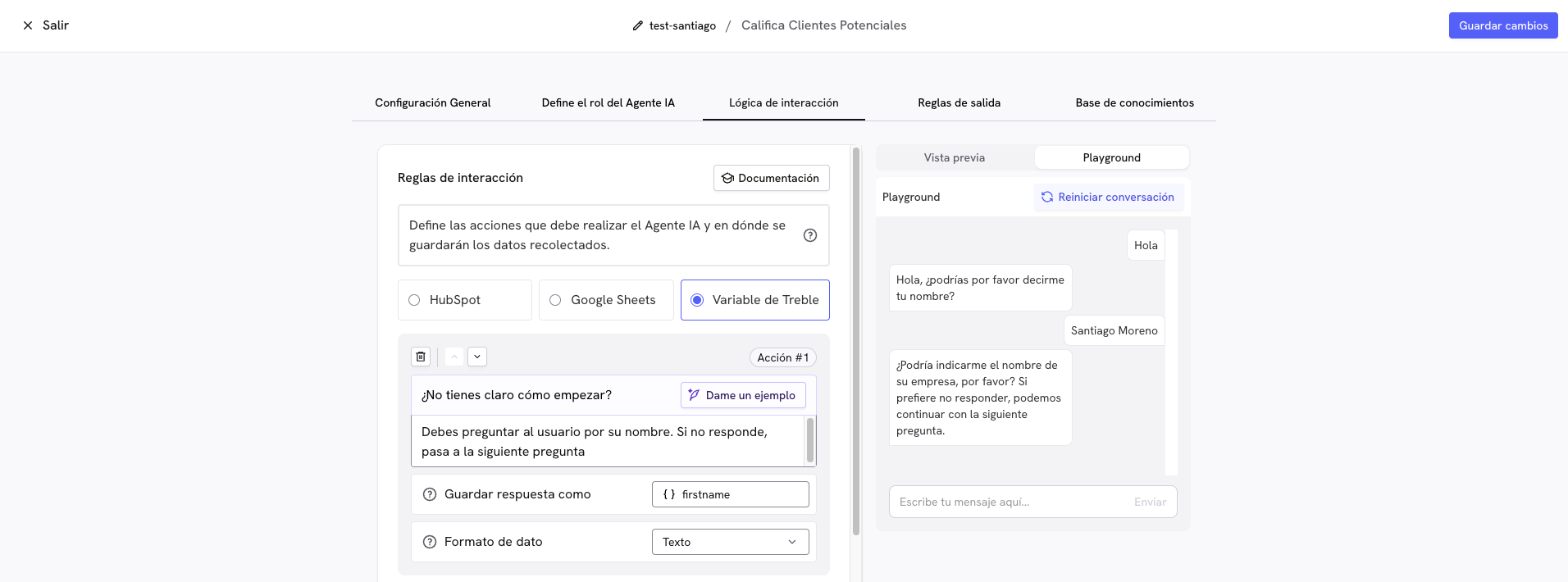
The **Playground** is the ideal environment to test and perfect your AI agent before testing it directly in a WhatsApp conversation. Here you can experiment, identify problems, and optimize conversations without affecting your real customers.
 ## Why use the Playground?
**🚀 Quick validation without needing to send a flow via WhatsApp**
* Test complete conversations in seconds
* No need to send real WhatsApp messages
* Experiment without limits until you're satisfied
**🔍 Find problems before your customers do**
* Identify confusing or incorrect responses
* Detect gaps in your knowledge base
* Test difficult scenarios and objections
**Important:** The Playground only tests the agent's conversational logic. CRM integrations are not executed here. You'll need to test those functions with a real WhatsApp conversation.
## 🎯 5-step testing methodology
### **Step 1: Test the basic flow (Happy Path)**
Simulate an ideal customer who follows the intended flow:
**Scenario:** Interested and collaborative customer
```
YOU: "Hi, I have questions about your services"
AGENT: [Welcome response]
YOU: "What are your hours?"
AGENT: [Hours information]
YOU: "How much does a consultation cost?"
AGENT: [Pricing information]
YOU: "I'm interested in scheduling"
AGENT: [Direction toward objective]
```
**✅ Verify that the agent:**
* Answers all questions correctly
* Provides complete and up-to-date information
* Naturally guides toward the objective
* Maintains an appropriate tone
**Scenario:** Prospect who provides complete information
```
YOU: "Hi, I'm interested in information"
AGENT: [Greeting and first question]
YOU: "My name is John Smith"
AGENT: [Confirms and next question]
YOU: "john@email.com"
AGENT: [Next qualification question]
[Continues providing all requested information]
```
**✅ Verify that the agent:**
* Asks questions in logical order
* Confirms received information
* Adapts questions according to answers
* Clearly indicates what information is missing
**Scenario:** Customer checking their account information and current plan
```
YOU: "Hi, I'd like to know what plan I'm subscribed to"
AGENT: [Reads HubSpot properties and provides plan information]
YOU: "When is my next payment?"
AGENT: [Queries renewal date in HubSpot]
YOU: "Perfect, can you send me this information by email?"
AGENT: [Creates ticket in HubSpot for follow-up]
```
**✅ Verify that the agent:**
* Correctly queries contact properties in HubSpot
* Uses appropriate tools according to the request
* Provides accurate information from the system
* Executes actions like creating tickets when necessary
### **Step 2: Test real customer scenarios**
Simulate typical behaviors of your customers:
**How to act:**
* Ask vague questions: "Can you help me?"
* Request comparisons: "What's better, A or B?"
* Show doubts: "I'm not sure if this is for me"
**What to evaluate?**
* Agent clarifies specific needs
* Provides useful comparisons
* Handles uncertainty without pushing
**How to act:**
* Use short phrases: "Price", "Hours", "Availability"
* Interrupt explanations: "Just tell me the cost"
* Indicate urgency: "I need this now"
**What to evaluate?**
* Concise and direct responses
* Essential information first
* Doesn't over-explain when not asked
**How to act:**
* Ask about prices immediately
* Compare with competition: "At X place it's cheaper"
* Look for discounts: "Do you have promotions?"
**What to evaluate?**
* Appropriately handles price objections
* Highlights value, not just price
* Offers alternatives when relevant
**How to act:**
* Avoids giving personal information
* Asks many questions before deciding
* Expresses distrust: "Is this safe?"
**What to evaluate?**
* Respects user privacy
* Provides security information
* Generates trust progressively
### **Step 3: Test extreme cases and objections**
Difficult scenarios reveal weaknesses:
**🚫 Boundary tests:**
```
❌ "This is too expensive, do you have anything free?"
❌ "I don't understand anything you're saying"
❌ "I want to talk to a human NOW"
❌ "Why do you need my personal information?"
```
**✅ Evaluate if the agent:**
* Handles objections without being pushy
* Explains clearly when it doesn't understand
* Respects user decisions
### **Step 4: Validate your knowledge base**
Ask specific questions about your business:
* What are your hours of operation?
* Where are you located?
* What payment methods do you accept?
* Do you deliver/ship?
* Do you have a warranty?
* Ask about specific products/services
* Request technical specifications
* Ask about compatibilities or requirements
* Inquire about internal processes
* Request comparisons between options
* Situations requiring multiple sources of information
* Questions combining multiple topics
* Scenarios your competition handles differently
* Special cases or exceptions
* Questions about recent updates
### **Step 5: Iterative optimization**
**🔄 Continuous improvement process:**
Note incorrect, confusing, or incomplete responses during testing.
Add missing information or clarify ambiguous content.
Use "Reset conversation" and repeat problematic scenarios.
Confirm that identified problems have been resolved.
**Reset the conversation after each change**: The "Reset conversation" button clears the entire session. Use it every time you modify the agent configuration to test changes.
## Signs you need more optimization
**🔴 Critical problems:**
* Incorrect answers about basic information
* Can't guide toward the main objective
* Provides contradictory information
* Gets confused with simple questions
**🟡 Areas for improvement:**
* Responses too long or short
* Difficulty with jargon or specific terms
* Doesn't handle objections well
* Missing information about special cases
**🟢 Ready for production:**
* Responds consistently well in all scenarios
* Handles extreme cases professionally
* Provides clear value in each interaction
* Users can easily achieve their objectives
## ⚡ Tips for efficient testing
**Simulate real personalities**: Think of 3-4 typical customer types you have and act like each one during testing.
**Document problems**: Keep a list of problematic responses so you can correct them systematically.
## 🔄 After Playground: Final validation
Once satisfied with Playground testing:
Send a WhatsApp conversation to verify everything works in the real environment.
If using HubSpot or Salesforce, confirm data is saved correctly.
Observe first real interactions to identify final adjustments.
Use real conversations to continue optimizing your agent.
## Next steps
Is your agent working well in the Playground? It's time to:
1. [**Configure your agent in conversations**](/en/docs/main-platform/ai-center/overview#using-ai-agents-in-conversations) - Integrate your agent into WhatsApp flows
2. [**Optimize your knowledge base**](/en/docs/main-platform/ai-center/knowledge-base) - Improve response quality
3. [**Review best practices by agent type**](/en/docs/main-platform/ai-center/overview#types-of-agents-available) - Specific tips for your agent
## Why use the Playground?
**🚀 Quick validation without needing to send a flow via WhatsApp**
* Test complete conversations in seconds
* No need to send real WhatsApp messages
* Experiment without limits until you're satisfied
**🔍 Find problems before your customers do**
* Identify confusing or incorrect responses
* Detect gaps in your knowledge base
* Test difficult scenarios and objections
**Important:** The Playground only tests the agent's conversational logic. CRM integrations are not executed here. You'll need to test those functions with a real WhatsApp conversation.
## 🎯 5-step testing methodology
### **Step 1: Test the basic flow (Happy Path)**
Simulate an ideal customer who follows the intended flow:
**Scenario:** Interested and collaborative customer
```
YOU: "Hi, I have questions about your services"
AGENT: [Welcome response]
YOU: "What are your hours?"
AGENT: [Hours information]
YOU: "How much does a consultation cost?"
AGENT: [Pricing information]
YOU: "I'm interested in scheduling"
AGENT: [Direction toward objective]
```
**✅ Verify that the agent:**
* Answers all questions correctly
* Provides complete and up-to-date information
* Naturally guides toward the objective
* Maintains an appropriate tone
**Scenario:** Prospect who provides complete information
```
YOU: "Hi, I'm interested in information"
AGENT: [Greeting and first question]
YOU: "My name is John Smith"
AGENT: [Confirms and next question]
YOU: "john@email.com"
AGENT: [Next qualification question]
[Continues providing all requested information]
```
**✅ Verify that the agent:**
* Asks questions in logical order
* Confirms received information
* Adapts questions according to answers
* Clearly indicates what information is missing
**Scenario:** Customer checking their account information and current plan
```
YOU: "Hi, I'd like to know what plan I'm subscribed to"
AGENT: [Reads HubSpot properties and provides plan information]
YOU: "When is my next payment?"
AGENT: [Queries renewal date in HubSpot]
YOU: "Perfect, can you send me this information by email?"
AGENT: [Creates ticket in HubSpot for follow-up]
```
**✅ Verify that the agent:**
* Correctly queries contact properties in HubSpot
* Uses appropriate tools according to the request
* Provides accurate information from the system
* Executes actions like creating tickets when necessary
### **Step 2: Test real customer scenarios**
Simulate typical behaviors of your customers:
**How to act:**
* Ask vague questions: "Can you help me?"
* Request comparisons: "What's better, A or B?"
* Show doubts: "I'm not sure if this is for me"
**What to evaluate?**
* Agent clarifies specific needs
* Provides useful comparisons
* Handles uncertainty without pushing
**How to act:**
* Use short phrases: "Price", "Hours", "Availability"
* Interrupt explanations: "Just tell me the cost"
* Indicate urgency: "I need this now"
**What to evaluate?**
* Concise and direct responses
* Essential information first
* Doesn't over-explain when not asked
**How to act:**
* Ask about prices immediately
* Compare with competition: "At X place it's cheaper"
* Look for discounts: "Do you have promotions?"
**What to evaluate?**
* Appropriately handles price objections
* Highlights value, not just price
* Offers alternatives when relevant
**How to act:**
* Avoids giving personal information
* Asks many questions before deciding
* Expresses distrust: "Is this safe?"
**What to evaluate?**
* Respects user privacy
* Provides security information
* Generates trust progressively
### **Step 3: Test extreme cases and objections**
Difficult scenarios reveal weaknesses:
**🚫 Boundary tests:**
```
❌ "This is too expensive, do you have anything free?"
❌ "I don't understand anything you're saying"
❌ "I want to talk to a human NOW"
❌ "Why do you need my personal information?"
```
**✅ Evaluate if the agent:**
* Handles objections without being pushy
* Explains clearly when it doesn't understand
* Respects user decisions
### **Step 4: Validate your knowledge base**
Ask specific questions about your business:
* What are your hours of operation?
* Where are you located?
* What payment methods do you accept?
* Do you deliver/ship?
* Do you have a warranty?
* Ask about specific products/services
* Request technical specifications
* Ask about compatibilities or requirements
* Inquire about internal processes
* Request comparisons between options
* Situations requiring multiple sources of information
* Questions combining multiple topics
* Scenarios your competition handles differently
* Special cases or exceptions
* Questions about recent updates
### **Step 5: Iterative optimization**
**🔄 Continuous improvement process:**
Note incorrect, confusing, or incomplete responses during testing.
Add missing information or clarify ambiguous content.
Use "Reset conversation" and repeat problematic scenarios.
Confirm that identified problems have been resolved.
**Reset the conversation after each change**: The "Reset conversation" button clears the entire session. Use it every time you modify the agent configuration to test changes.
## Signs you need more optimization
**🔴 Critical problems:**
* Incorrect answers about basic information
* Can't guide toward the main objective
* Provides contradictory information
* Gets confused with simple questions
**🟡 Areas for improvement:**
* Responses too long or short
* Difficulty with jargon or specific terms
* Doesn't handle objections well
* Missing information about special cases
**🟢 Ready for production:**
* Responds consistently well in all scenarios
* Handles extreme cases professionally
* Provides clear value in each interaction
* Users can easily achieve their objectives
## ⚡ Tips for efficient testing
**Simulate real personalities**: Think of 3-4 typical customer types you have and act like each one during testing.
**Document problems**: Keep a list of problematic responses so you can correct them systematically.
## 🔄 After Playground: Final validation
Once satisfied with Playground testing:
Send a WhatsApp conversation to verify everything works in the real environment.
If using HubSpot or Salesforce, confirm data is saved correctly.
Observe first real interactions to identify final adjustments.
Use real conversations to continue optimizing your agent.
## Next steps
Is your agent working well in the Playground? It's time to:
1. [**Configure your agent in conversations**](/en/docs/main-platform/ai-center/overview#using-ai-agents-in-conversations) - Integrate your agent into WhatsApp flows
2. [**Optimize your knowledge base**](/en/docs/main-platform/ai-center/knowledge-base) - Improve response quality
3. [**Review best practices by agent type**](/en/docs/main-platform/ai-center/overview#types-of-agents-available) - Specific tips for your agent