> ## Documentation Index
> Fetch the complete documentation index at: https://help.treble.ai/llms.txt
> Use this file to discover all available pages before exploring further.
# Introduction
> Automate WhatsApp conversations with specialized AI agents that improve customer experience and increase your conversions.
In the **AI Center** you can create and edit artificial intelligence agents to integrate them into your WhatsApp conversational flows. These agents are designed to automate specific tasks, improve customer experience, and optimize your sales processes.
 ## Why use AI agents in your conversations?
Treble's AI agents transform the way you interact with your potential customers, offering immediate benefits:
**🚀 Improve customer experience:**
* Instant 24/7 responses, no waiting
* More fluid and natural conversations
**📈 Increase your conversions:**
* Reduce abandonment with immediate attention
* Automatically qualify your best prospects
* Guide users toward specific actions
**⏰ Optimize your time:**
* Automate repetitive qualification tasks
* Free up your team for higher-value conversations
* Capture key information without manual intervention
AI agents need specific context about your company, products, and processes to work correctly. The more quality information you provide, the better results you'll get.
## Types of agents available
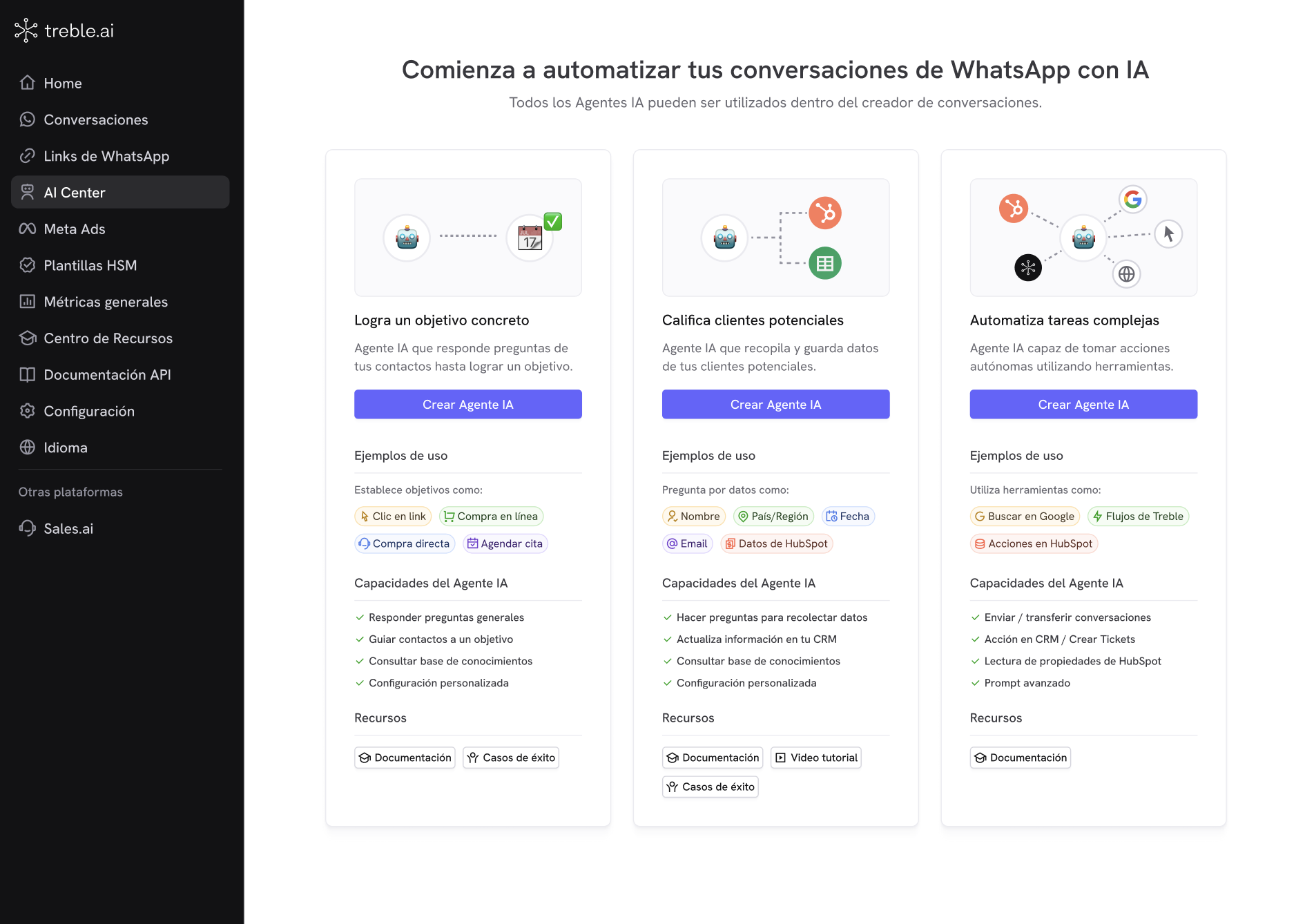
Treble offers three types of specialized AI agents for different use cases:
Specialized in answering questions and guiding conversations until the user decides to take a specific action. It doesn't execute actions automatically, but educates and informs to facilitate the user's decision.
[View complete guide →](/en/docs/main-platform/ai-center/agents/objective-ai)
Specialized in collecting and evaluating information from potential customers through strategic questions, automatically saving data in HubSpot, Salesforce, or Treble variables.
[View complete guide →](/en/docs/main-platform/ai-center/agents/lead-qualification)
Specialized in automating complex processes with multiple possibilities. Can call custom tools, apply conditional rules, and escalate conversations according to your specific business needs.
[View complete guide →](/en/docs/main-platform/ai-center/agents/reasoning-agent)
## When to use each type of agent?
**Ideal for answering questions until the user decides to act:**
**Main use cases:**
* 🏥 **Medical information**: Answer about services, hours, and procedures until the user decides to schedule
* 🎓 **Events and education**: Provide details about courses, dates, and requirements to facilitate enrollment
* 🛒 **Pre-sales support**: Resolve questions about products until the user is ready to buy
* 🏢 **Business information**: Explain services and processes to direct toward quotes or consultations
* 📞 **Basic qualification**: Answer general questions before connecting with a specialized human
**The agent DOES NOT perform actions automatically** - it only informs and educates so the user can make the decision.
**Ideal for collecting and evaluating prospect information:**
**Use cases by industry:**
* 🏠 **Real estate**: Collect budget, area of interest, property type, and purchase urgency
* 🎓 **Education**: Capture education level, program of interest, preferred modality, and availability
* 💼 **B2B services**: Evaluate company size, budget, specific needs, and timeline
* 🏥 **Medicine**: Collect information about symptoms, availability, type of consultation, and urgency
* 🛒 **E-commerce**: Identify product needs, price range, previous experiences
* 📈 **Consulting**: Determine current challenges, goals, budget, and decision authority
**All data is automatically saved** in HubSpot, Sheets, or Treble variables for immediate follow-up.
**Ideal for automating complex processes with multiple possibilities:**
**Main use cases:**
* 🔄 **Account queries**: Reads HubSpot properties to inform about current plan, renewal date, and subscription status
* 🎫 **Ticket management**: Creates and updates tickets automatically based on user requests
* 📊 **Data updates**: Modifies contact properties in your CRM based on the conversation
* 🔀 **Conditional flows**: Executes different actions depending on customer status or request type
* 🛠️ **Tool integration**: Combines multiple HubSpot and Treble tools in a single conversation
**The agent can execute actions automatically** using custom tools according to your business rules.
## General configuration
You can assign a **name** and **description** to all AI agents. Each type is specialized for specific use cases, but you can fully customize them according to your needs through:
* **Knowledge base**: Information about your company, products, and processes
* **Custom instructions**: Specific tone, style, and behavior
* **Advanced configuration**: Integrations, variables, and exit rules
## Using AI agents in conversations
Once your agent is created and saved, you can integrate it into your conversational flows:
Access the flow builder from your main dashboard.
Look for the block corresponding to your agent type in the toolbar.
Choose the agent you created from the dropdown list.
Drag and connect the block with the rest of your conversational flow.
Define what happens according to the different agent results.
* You can use more than one AI agent in the same conversation and combine them with conditional blocks to create more sophisticated experiences.
## Next steps
Decide if you need a [Take your customers to a goal](/en/docs/main-platform/ai-center/agents/objective-ai), [Lead Qualification](/en/docs/main-platform/ai-center/agents/lead-qualification), or [Automate complex tasks](/en/docs/main-platform/ai-center/agents/reasoning-agent) agent according to your use case.
Review the [knowledge base best practices](/en/docs/main-platform/ai-center/knowledge-base) before configuring your agent.
Follow the specific guide to create and configure your selected agent.
## Why use AI agents in your conversations?
Treble's AI agents transform the way you interact with your potential customers, offering immediate benefits:
**🚀 Improve customer experience:**
* Instant 24/7 responses, no waiting
* More fluid and natural conversations
**📈 Increase your conversions:**
* Reduce abandonment with immediate attention
* Automatically qualify your best prospects
* Guide users toward specific actions
**⏰ Optimize your time:**
* Automate repetitive qualification tasks
* Free up your team for higher-value conversations
* Capture key information without manual intervention
AI agents need specific context about your company, products, and processes to work correctly. The more quality information you provide, the better results you'll get.
## Types of agents available
Treble offers three types of specialized AI agents for different use cases:
Specialized in answering questions and guiding conversations until the user decides to take a specific action. It doesn't execute actions automatically, but educates and informs to facilitate the user's decision.
[View complete guide →](/en/docs/main-platform/ai-center/agents/objective-ai)
Specialized in collecting and evaluating information from potential customers through strategic questions, automatically saving data in HubSpot, Salesforce, or Treble variables.
[View complete guide →](/en/docs/main-platform/ai-center/agents/lead-qualification)
Specialized in automating complex processes with multiple possibilities. Can call custom tools, apply conditional rules, and escalate conversations according to your specific business needs.
[View complete guide →](/en/docs/main-platform/ai-center/agents/reasoning-agent)
## When to use each type of agent?
**Ideal for answering questions until the user decides to act:**
**Main use cases:**
* 🏥 **Medical information**: Answer about services, hours, and procedures until the user decides to schedule
* 🎓 **Events and education**: Provide details about courses, dates, and requirements to facilitate enrollment
* 🛒 **Pre-sales support**: Resolve questions about products until the user is ready to buy
* 🏢 **Business information**: Explain services and processes to direct toward quotes or consultations
* 📞 **Basic qualification**: Answer general questions before connecting with a specialized human
**The agent DOES NOT perform actions automatically** - it only informs and educates so the user can make the decision.
**Ideal for collecting and evaluating prospect information:**
**Use cases by industry:**
* 🏠 **Real estate**: Collect budget, area of interest, property type, and purchase urgency
* 🎓 **Education**: Capture education level, program of interest, preferred modality, and availability
* 💼 **B2B services**: Evaluate company size, budget, specific needs, and timeline
* 🏥 **Medicine**: Collect information about symptoms, availability, type of consultation, and urgency
* 🛒 **E-commerce**: Identify product needs, price range, previous experiences
* 📈 **Consulting**: Determine current challenges, goals, budget, and decision authority
**All data is automatically saved** in HubSpot, Sheets, or Treble variables for immediate follow-up.
**Ideal for automating complex processes with multiple possibilities:**
**Main use cases:**
* 🔄 **Account queries**: Reads HubSpot properties to inform about current plan, renewal date, and subscription status
* 🎫 **Ticket management**: Creates and updates tickets automatically based on user requests
* 📊 **Data updates**: Modifies contact properties in your CRM based on the conversation
* 🔀 **Conditional flows**: Executes different actions depending on customer status or request type
* 🛠️ **Tool integration**: Combines multiple HubSpot and Treble tools in a single conversation
**The agent can execute actions automatically** using custom tools according to your business rules.
## General configuration
You can assign a **name** and **description** to all AI agents. Each type is specialized for specific use cases, but you can fully customize them according to your needs through:
* **Knowledge base**: Information about your company, products, and processes
* **Custom instructions**: Specific tone, style, and behavior
* **Advanced configuration**: Integrations, variables, and exit rules
## Using AI agents in conversations
Once your agent is created and saved, you can integrate it into your conversational flows:
Access the flow builder from your main dashboard.
Look for the block corresponding to your agent type in the toolbar.
Choose the agent you created from the dropdown list.
Drag and connect the block with the rest of your conversational flow.
Define what happens according to the different agent results.
* You can use more than one AI agent in the same conversation and combine them with conditional blocks to create more sophisticated experiences.
## Next steps
Decide if you need a [Take your customers to a goal](/en/docs/main-platform/ai-center/agents/objective-ai), [Lead Qualification](/en/docs/main-platform/ai-center/agents/lead-qualification), or [Automate complex tasks](/en/docs/main-platform/ai-center/agents/reasoning-agent) agent according to your use case.
Review the [knowledge base best practices](/en/docs/main-platform/ai-center/knowledge-base) before configuring your agent.
Follow the specific guide to create and configure your selected agent.