> ## Documentation Index
> Fetch the complete documentation index at: https://help.treble.ai/llms.txt
> Use this file to discover all available pages before exploring further.
# Conversation history in the CRM
> How the WhatsApp conversation is saved in Salesforce: when it's written, which record it lands on, and which fields are filled in.
When a conversation is closed, Treble writes the **full history** to Salesforce so your advisors can see it inside the person's record, without leaving the CRM.
**It's written only once, when the conversation is closed.** While the conversation is in progress you won't see anything in Salesforce. If a conversation is never closed, its history is never written.
## Where it's saved
Treble writes the history as a Salesforce **Task** or **Event**, depending on how your integration is configured.
| | Event | Task |
| - | - | - |
| Salesforce object | `Event` | `Task` |
| Where it shows up | In the calendar and in the record's activity section | In the record's activity section |
| Is the default value | Yes | No |
Choosing between Task and Event is an integration setting, not something you change from the blocks. If you want to change it, reach out to your Customer Success Manager.
The practical difference is where the advisor sees it: Events also show up in the Salesforce calendar, which for some teams is noise and for others is exactly what they need.
### What it looks like in Salesforce
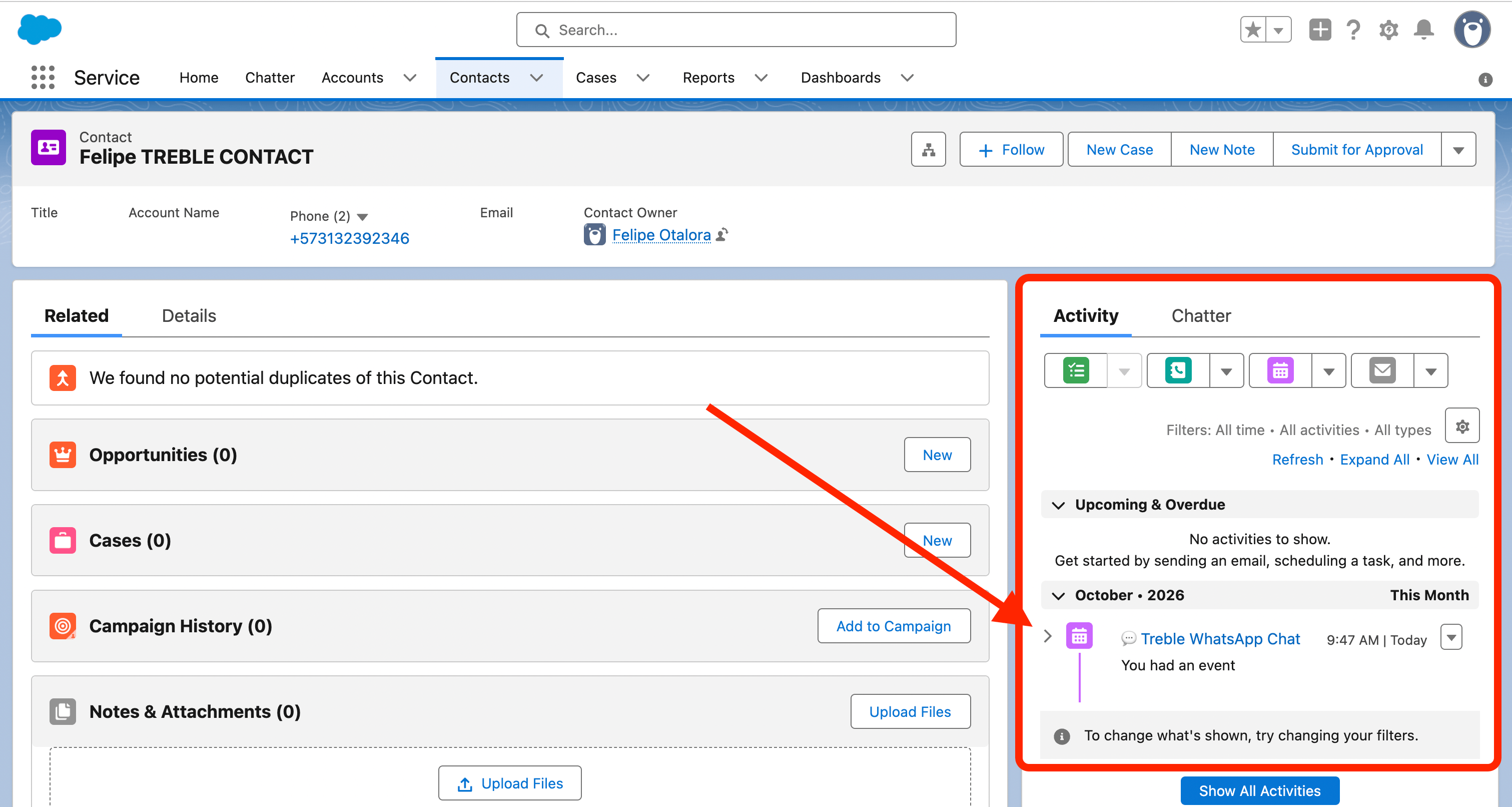
In the person's record, the conversation shows up in the **Activity** panel, with the subject *💬 Treble WhatsApp Chat*:
 Clicking it opens the activity with the full transcript:
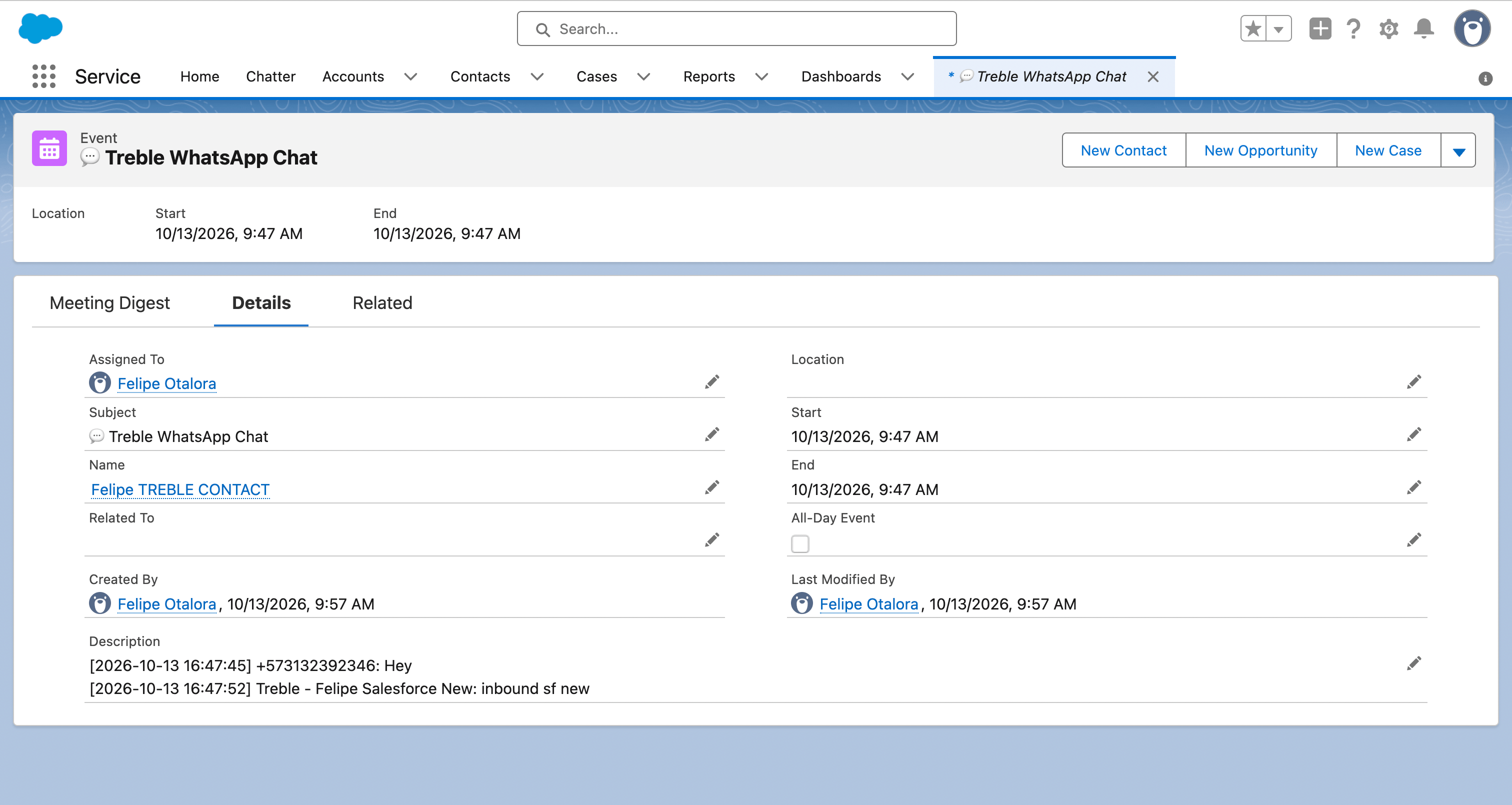 It's worth noticing three things on this screen, because they explain questions that come up later:
* **Start and End have the same time.** The event lasts zero minutes on purpose.
* **Created By is later than Start.** The activity carries the date the conversation *started*, but it's created when the conversation is **closed**. In the example, the event is at 9:47 and was created at 9:57.
* **"Name" was filled in and "Related To" was left empty.** It's a `Contact`, so Salesforce relates it through the person field. On an `Account` or a custom object it would be the other way around.
### Which fields are filled in
Always the same text: **💬 Treble WhatsApp Chat**. This makes it easy to filter all activities coming from Treble in Salesforce.
The full transcript of the conversation: the bot's messages, the person's replies, and the advisor's messages if there was a handoff to a human.
Each line includes the date and time, who spoke, and the message:
```
[2026-10-13 16:47:45] +573132392346: Hola
[2026-10-13 16:47:52] Treble - Campaña de ejemplo: ¡Bienvenido!
```
The person's messages are identified by their phone number, and Treble's by the campaign name.
The **record owner** in Salesforce. The activity is assigned to that person, not to a generic integration user.
**It can't be changed from the flow.** Treble reads the record owner at the moment it writes the activity; there's no way to assign it to another user with a block or a variable.
If you need the activity to be assigned to someone else, the options are to change the record owner in Salesforce, or a Salesforce automation that reassigns the activity after it's created.
The date and time the conversation **started**.
For Events, the start time and end time are the same, so the event shows up in the calendar with zero duration. This is the expected behavior.
The activity is related to the person's record. Salesforce uses two different fields depending on the object type:
* **Name** (`WhoId`) when the record is a `Contact` or a `Lead`.
* **Related To** (`WhatId`) for any other object, such as `Account` or a custom object.
Treble picks the right field automatically. That's why in the screen above, since it's a `Contact`, **Name** was filled in and **Related To** was left blank.
## Which record it lands on
On the record of your **parent entity** associated with that person.
On **each** of the objects Treble identified or created during that conversation.
If in a conversation Treble worked on an `Account` and on a custom requests object, the history is written to both. This is on purpose: the advisor who opens either record sees the conversation.
## Also saving to a custom object
If your org has the Treble custom object created, the history is **also** saved there, with rich formatting (line breaks and images), in addition to the Task or Event.
It's not an alternative: it's an additional layer, and it's enabled simply by creating the object in Salesforce.
It's worth noticing three things on this screen, because they explain questions that come up later:
* **Start and End have the same time.** The event lasts zero minutes on purpose.
* **Created By is later than Start.** The activity carries the date the conversation *started*, but it's created when the conversation is **closed**. In the example, the event is at 9:47 and was created at 9:57.
* **"Name" was filled in and "Related To" was left empty.** It's a `Contact`, so Salesforce relates it through the person field. On an `Account` or a custom object it would be the other way around.
### Which fields are filled in
Always the same text: **💬 Treble WhatsApp Chat**. This makes it easy to filter all activities coming from Treble in Salesforce.
The full transcript of the conversation: the bot's messages, the person's replies, and the advisor's messages if there was a handoff to a human.
Each line includes the date and time, who spoke, and the message:
```
[2026-10-13 16:47:45] +573132392346: Hola
[2026-10-13 16:47:52] Treble - Campaña de ejemplo: ¡Bienvenido!
```
The person's messages are identified by their phone number, and Treble's by the campaign name.
The **record owner** in Salesforce. The activity is assigned to that person, not to a generic integration user.
**It can't be changed from the flow.** Treble reads the record owner at the moment it writes the activity; there's no way to assign it to another user with a block or a variable.
If you need the activity to be assigned to someone else, the options are to change the record owner in Salesforce, or a Salesforce automation that reassigns the activity after it's created.
The date and time the conversation **started**.
For Events, the start time and end time are the same, so the event shows up in the calendar with zero duration. This is the expected behavior.
The activity is related to the person's record. Salesforce uses two different fields depending on the object type:
* **Name** (`WhoId`) when the record is a `Contact` or a `Lead`.
* **Related To** (`WhatId`) for any other object, such as `Account` or a custom object.
Treble picks the right field automatically. That's why in the screen above, since it's a `Contact`, **Name** was filled in and **Related To** was left blank.
## Which record it lands on
On the record of your **parent entity** associated with that person.
On **each** of the objects Treble identified or created during that conversation.
If in a conversation Treble worked on an `Account` and on a custom requests object, the history is written to both. This is on purpose: the advisor who opens either record sees the conversation.
## Also saving to a custom object
If your org has the Treble custom object created, the history is **also** saved there, with rich formatting (line breaks and images), in addition to the Task or Event.
It's not an alternative: it's an additional layer, and it's enabled simply by creating the object in Salesforce.
Create the custom object
## Common issues
Check in this order:
1. **Is the conversation actually closed?** If it's still open in Sales, the history hasn't been written yet.
2. **Did Treble find the record?** If the person doesn't exist in Salesforce, there's nowhere to write the activity.
3. **Does the record have an owner?** Treble needs an owner to create the activity. A record without an owner, or one the integration user can't see, is left without history.
4. **Were there any messages?** A conversation without any messages doesn't generate an activity.
In multi-object, Treble writes to the objects it **identified in that conversation**. If an object wasn't touched during the conversation, it doesn't receive history.
That's how the *Event* type behaves. If you'd rather the history not touch the calendar, ask your Customer Success Manager to switch the integration to *Task*.
The Task and the Event store the transcript as plain text, because that's how those fields are in Salesforce. To see the conversation with rich formatting and images, create the [custom object](/en/docs/integrations/salesforce/features/custom-object).
## Next steps
Save the history with rich formatting and images.
Reply to active conversations without leaving the CRM.
This documentation is built and hosted on [Mintlify](https://mintlify.com), a developer documentation platform.