> ## Documentation Index
> Fetch the complete documentation index at: https://help.treble.ai/llms.txt
> Use this file to discover all available pages before exploring further.
# Conditional Block
> Learn to use Treble's conditional block. This block allows you to change the flow of a conversation based on the contact's properties in HubSpot.
# HubSpot Conditional Block
The conditional block allows you to control the flow of the conversation based on the properties of a contact in HubSpot. This way, you can personalize the conversation based on data you already have about the contact.
## How is it used?
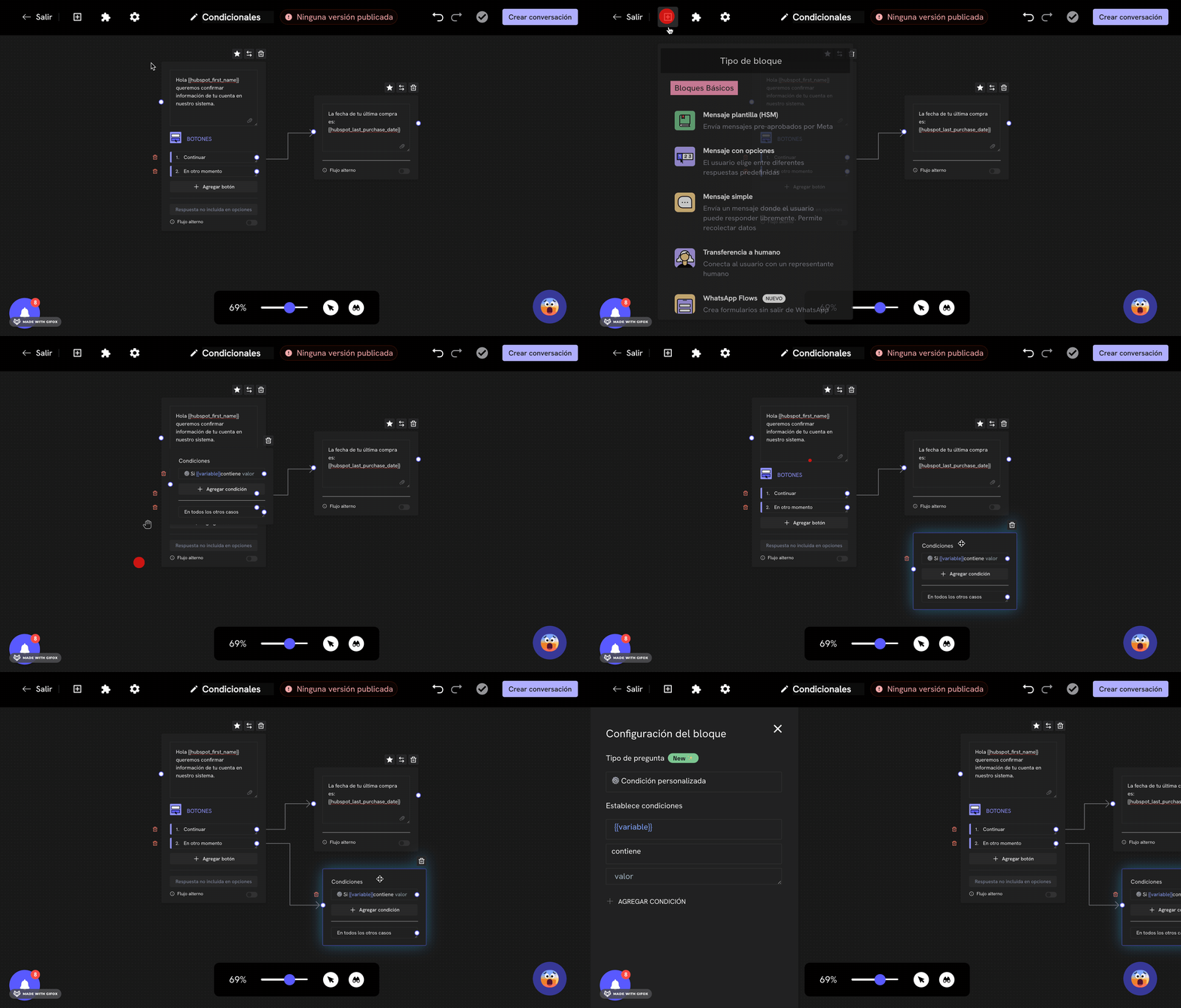
1. Log in to Treble.ai at: app.treble.ai
2. Go to **Create Conversation**
3. Click on the button to display the block menu
4. Scroll until you find the **Conditional** block
5. Click on the **Conditional** block to add it to your conversation
6. Move the **Conditional** block to the desired position in your flow
7. Connect the **Conditional** block to the **Question** block
8. Once you've added the **Conditional** block, double-click on the block to display the configuration menu
 ## Configuring the Conditional Block
In the configuration panel, you must select which property of the contact in HubSpot you want to evaluate. You can select from a list of predefined properties.
After selecting the property, you need to define the conditions that will determine the path the contact will take in the conversation. This is done by specifying:
1. **An operator**: equals, does not equal, contains, does not contain, is set, is not set, greater than, less than, etc.
2. **A value**: the specific value to compare with the contact's property
Depending on whether the condition is met or not, the contact will follow the "True" or "False" path in your conversation flow.
## Example Use Cases
* **Personalized Promotions**: Offer different promotions based on the contact's purchase history
* **Language Selection**: Direct the conversation path based on the contact's preferred language
* **Lead Qualification**: Route high-priority leads to a human agent based on lead score
* **Subscription Status**: Show different options based on whether the contact is already a subscriber
For the conditional to work properly, make sure the property you're evaluating exists in your HubSpot account and that data is correctly synced between HubSpot and Treble.
## Best Practices
* Keep conditions simple and clear
* Test your conditional flows thoroughly before deploying
* Consider what happens if the property value is missing or unexpected
* Use descriptive labels for your condition branches to make the flow easier to understand
The conditional block is a powerful way to create dynamic, personalized conversations that leverage your existing CRM data.
## Configuring the Conditional Block
In the configuration panel, you must select which property of the contact in HubSpot you want to evaluate. You can select from a list of predefined properties.
After selecting the property, you need to define the conditions that will determine the path the contact will take in the conversation. This is done by specifying:
1. **An operator**: equals, does not equal, contains, does not contain, is set, is not set, greater than, less than, etc.
2. **A value**: the specific value to compare with the contact's property
Depending on whether the condition is met or not, the contact will follow the "True" or "False" path in your conversation flow.
## Example Use Cases
* **Personalized Promotions**: Offer different promotions based on the contact's purchase history
* **Language Selection**: Direct the conversation path based on the contact's preferred language
* **Lead Qualification**: Route high-priority leads to a human agent based on lead score
* **Subscription Status**: Show different options based on whether the contact is already a subscriber
For the conditional to work properly, make sure the property you're evaluating exists in your HubSpot account and that data is correctly synced between HubSpot and Treble.
## Best Practices
* Keep conditions simple and clear
* Test your conditional flows thoroughly before deploying
* Consider what happens if the property value is missing or unexpected
* Use descriptive labels for your condition branches to make the flow easier to understand
The conditional block is a powerful way to create dynamic, personalized conversations that leverage your existing CRM data.