> ## Documentation Index
> Fetch the complete documentation index at: https://help.treble.ai/llms.txt
> Use this file to discover all available pages before exploring further.
# 📣 Meta Events — Measure What Matters
> This page explains how to use the Meta Events node within Treble’s conversation builder. This node allows customers to send key events (such as purchases, order creation, or shipments) to Meta’s Conversions API, as long as the conversation was initiated from a Click to WhatsApp ad. It outlines the steps required to configure the node, select the event type, define its parameters, and place it correctly within the flow. It also provides context on the purpose of the node and includes links to relevant documentation.
**Meta Events** is a new node in Treble’s conversation builder that allows you to track and send key conversion events—like purchases, cart actions, or payment attempts—directly to Meta via the **Conversions API for Business Messaging**.
By integrating with this API, you can measure the real impact of your Click to WhatsApp campaigns beyond just the number of conversations started. You’ll gain visibility into what happens *after* users engage: do they buy, abandon their cart, complete a payment?
**Why this matters**: Meta’s Ads Manager can now attribute outcomes like purchases or lead creation back to the conversations your team is having. This helps optimize ad performance, improve targeting, and justify budget spend on Click to WhatsApp ads.
📚 [Learn more about Meta’s Conversions API](https://business.whatsapp.com/blog/conversions-api-messaging)
📄 [View the full list of supported WhatsApp Events](https://developers.facebook.com/docs/marketing-api/conversions-api/business-messaging/#frequently-asked-questions)
## **🧩 How It Works**
Using the **Meta Events** node is simple and requires just a few steps inside the conversation builder:
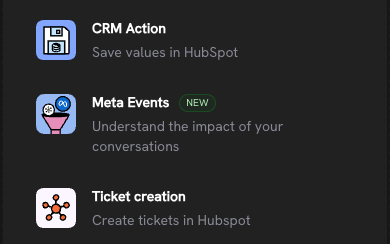
1. **Select the Meta Events Node**
From the list of available nodes in the flow builder, choose **Meta Events**. You’ll see the Meta icon next to the label to help you identify it quickly.
 2. **Choose the Event Type**
Select from the list of standard events supported by Meta, such as *Purchase*, *Add to Cart*, *Checkout Started*, etc.
2. **Choose the Event Type**
Select from the list of standard events supported by Meta, such as *Purchase*, *Add to Cart*, *Checkout Started*, etc.
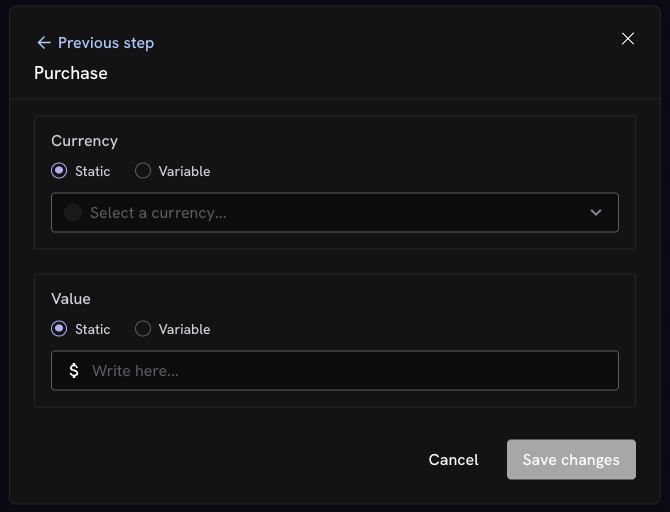
 3. **Configure Event Parameters (Purchase, Order Created, and Order Shipped events only)**
Define the required values like currency and amount for the purchase, order created, and order shipped events. You can use either fixed values or flow variables depending on your logic.
3. **Configure Event Parameters (Purchase, Order Created, and Order Shipped events only)**
Define the required values like currency and amount for the purchase, order created, and order shipped events. You can use either fixed values or flow variables depending on your logic.
 4. **Place the Node in the Right Moment**
Add the node after an interaction or condition that logically triggers the event you want to report. For example, after a user completes a purchase, confirms an order, or abandons a cart.
5. **Treble Handles the Rest**
Once live, Treble will send the event—including the ctwa\_clid that links it to the original ad click—directly to Meta’s Conversions API.
\_Note: This node only works if the conversation was initiated via a Click to WhatsApp ad and your account has been properly configured with \_[*Meta’s Conversions API.*](https://www.facebook.com/business/help/898185560232180?id=1205376682832142)
*If no valid ad click ID (ctwa\_clid) is available, the flow will run normally, but no event will be sent to Meta.*
4. **Place the Node in the Right Moment**
Add the node after an interaction or condition that logically triggers the event you want to report. For example, after a user completes a purchase, confirms an order, or abandons a cart.
5. **Treble Handles the Rest**
Once live, Treble will send the event—including the ctwa\_clid that links it to the original ad click—directly to Meta’s Conversions API.
\_Note: This node only works if the conversation was initiated via a Click to WhatsApp ad and your account has been properly configured with \_[*Meta’s Conversions API.*](https://www.facebook.com/business/help/898185560232180?id=1205376682832142)
*If no valid ad click ID (ctwa\_clid) is available, the flow will run normally, but no event will be sent to Meta.*