> ## Documentation Index
> Fetch the complete documentation index at: https://help.treble.ai/llms.txt
> Use this file to discover all available pages before exploring further.
# Mobile App for Agents
> Discover treble's mobile app, a tool that keeps your agents connected and productive at all times, ensuring smooth and efficient communication with customers from anywhere.
The treble Mobile App allows agents to search for users and contacts, view message history, and send HSMs to users to initiate conversations with customized values. With the app on their phone, agents receive push notifications when there are new messages or conversations.
When receiving a response, conversations will appear in the chat list. Interaction is similar to the platform, allowing sending images and files, which can be downloaded or added from the phone.
Additionally, it allows transferring conversations to specific teams or sales agents, sorting messages according to your needs, and managing your active or inactive status on the platform.
It is important for agents to have the app installed on their mobile phone in order to interact with customers. Additionally, agents need to have an assigned password to be able to log into the application.
# How to download the treble app?
You can download the treble app from the
page. To install it, just open this page in your mobile device's browser.
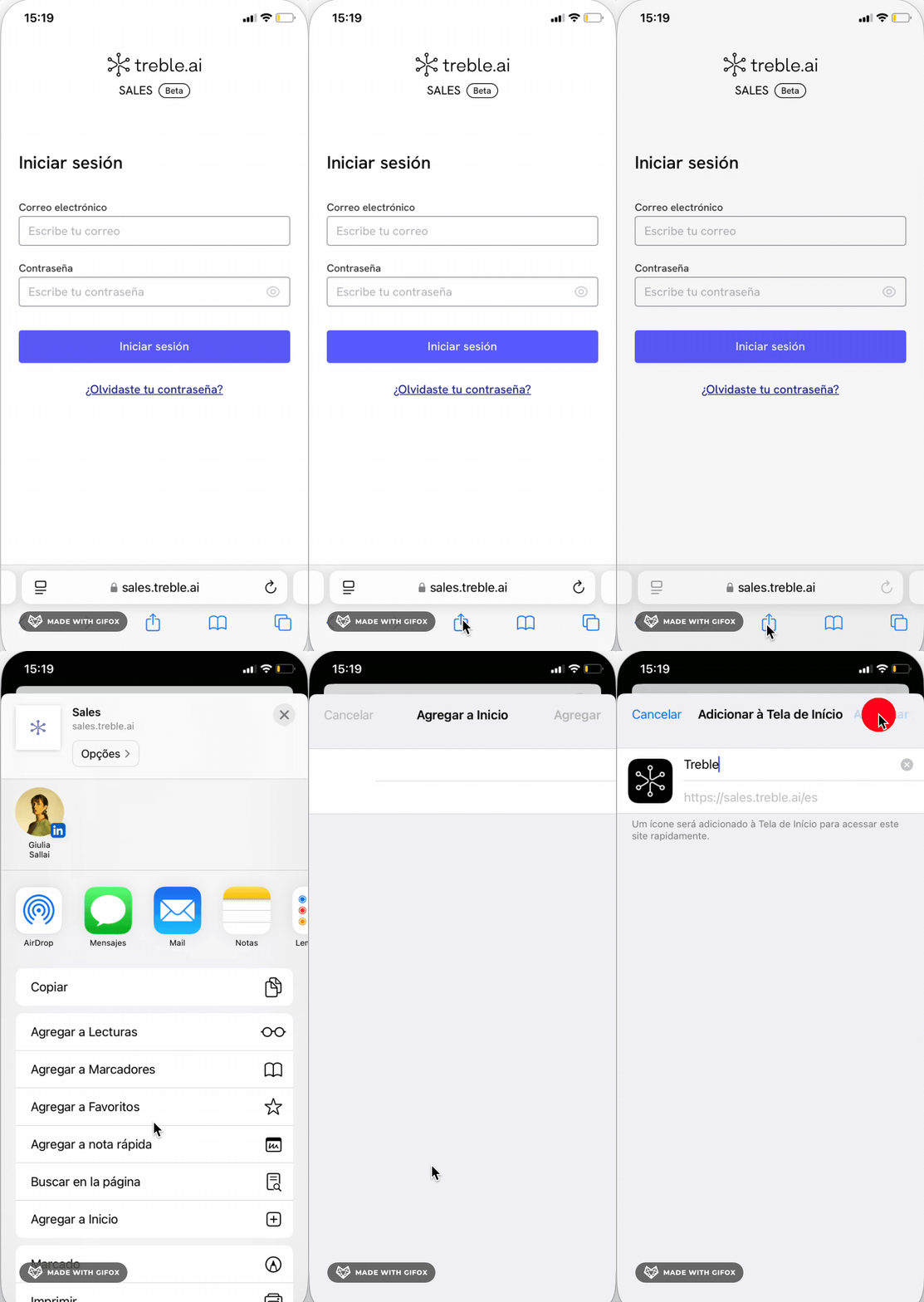
The installation varies depending on your operating system and browser. Here are the steps to install treble:
### For iOS system or Safari browser:
1. Go to
## What functionalities are available in the [treble.ai](http://treble.ai) mobile app?
The treble Mobile App allows agents to search for users and contacts, view message history, and send HSMs to users to initiate conversations with customized values. With the app on their phone, agents receive push notifications when there are new messages or conversations.
When receiving a response, conversations will appear in the chat list. Interaction is similar to the platform, allowing sending images and files, which can be downloaded or added from the phone.
Additionally, it allows transferring conversations to specific teams or sales agents, sorting messages according to your needs, and managing your active or inactive status on the platform.
You will only receive the notification on your mobile if you are not connected to the sales.treble.ai platform from your computer or another device
## Conclusion and next steps
The treble mobile app represents a fundamental tool for maintaining effective and continuous communication with customers. Its intuitive interface and comprehensive functionalities allow agents to efficiently manage conversations from anywhere.
To start taking advantage of all the benefits of the treble mobile app, we recommend:
1. Download and install the app following the steps mentioned above
2. Familiarize yourself with the different functionalities available
3. Configure push notifications to stay up to date with conversations
If you need additional help or have questions about using the app, don't hesitate to contact our technical support team.
 ### For Android system or Chrome browser:
1. Go to
### For Android system or Chrome browser:
1. Go to 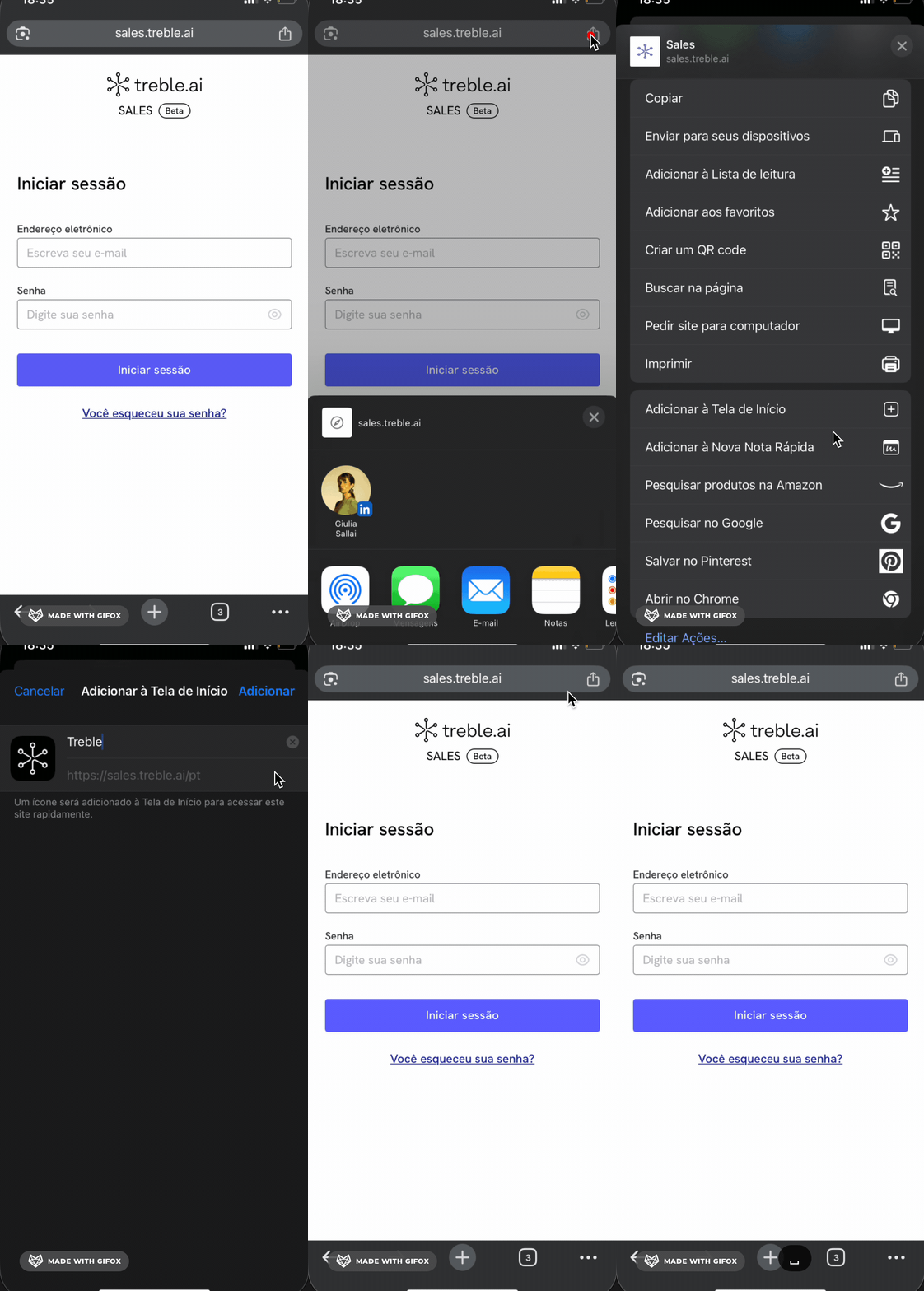 ## What functionalities are available in the [treble.ai](http://treble.ai) mobile app?
The treble Mobile App allows agents to search for users and contacts, view message history, and send HSMs to users to initiate conversations with customized values. With the app on their phone, agents receive push notifications when there are new messages or conversations.
When receiving a response, conversations will appear in the chat list. Interaction is similar to the platform, allowing sending images and files, which can be downloaded or added from the phone.
Additionally, it allows transferring conversations to specific teams or sales agents, sorting messages according to your needs, and managing your active or inactive status on the platform.
## What functionalities are available in the [treble.ai](http://treble.ai) mobile app?
The treble Mobile App allows agents to search for users and contacts, view message history, and send HSMs to users to initiate conversations with customized values. With the app on their phone, agents receive push notifications when there are new messages or conversations.
When receiving a response, conversations will appear in the chat list. Interaction is similar to the platform, allowing sending images and files, which can be downloaded or added from the phone.
Additionally, it allows transferring conversations to specific teams or sales agents, sorting messages according to your needs, and managing your active or inactive status on the platform.